

Hotel Agreement Workflow: Does Every Document Need a Signature?
· Jasmine Apps

Your document process can create work because it asks for the wrong action. Sending every piece of information through the same signature route can add chasing without clarifying what the recipient is meant to decide. Your hotel agreement workflow should begin with the purpose of each document, then follow the review and formalities that actually apply.
Sign Jasmine provides document roles and states to explore. You should use them within a venue-approved process rather than assume the software decides which documents need a legally effective signature.
Key Takeaways
- Classify document purpose before choosing the recipient action.
- Separate information delivery, internal approval and signature.
- Confirm applicable formalities for the actual document.
- Use role and version controls within your approved process.
- Measure avoidable routing work without removing required review.
Audit your hotel agreement workflow by document purpose
You should create a short inventory of the documents your team sends regularly. Record why each exists, what decision or acknowledgement is needed and who is responsible for the content. Your event proposal, service notice and internal purchasing request may have different purposes even when all are PDFs.
Do not classify a document solely by its filename. A document labelled confirmation may contain an agreement requiring review, while a document labelled contract may still be awaiting internal approval. Your responsible person should decide the intended route from the actual content and transaction.
The Law Commission’s electronic-execution guidance explains that electronic signatures can execute documents where authenticating intent and applicable formalities are satisfied. It also recognises that different documents can have different requirements. Your workflow therefore needs the relevant legal and policy review rather than a blanket assumption that every PDF follows one rule.
You can use three practical route labels for your audit: information, approval and signature. They are organising categories for your venue to approve, not legal conclusions generated by the app. A document may need more than one stage before it reaches the final recipient.
Write the recipient’s task in plain language. Someone receiving information should know what it means for them; someone reviewing a draft should know what they can approve or change. A signer should know which final version and role the approved process requires.
This article addresses route selection across the document inventory. Keep your existing document version-control guide for the detailed record discipline once the correct process is chosen.
Measure your hotel agreement workflow without removing necessary checks
Your audit can reveal repeated routing work, but the objective is not to eliminate every review. Required approval and applicable formalities remain part of a responsible process. Look for duplicated actions or unclear recipient tasks rather than using a low time total as the only definition of success.
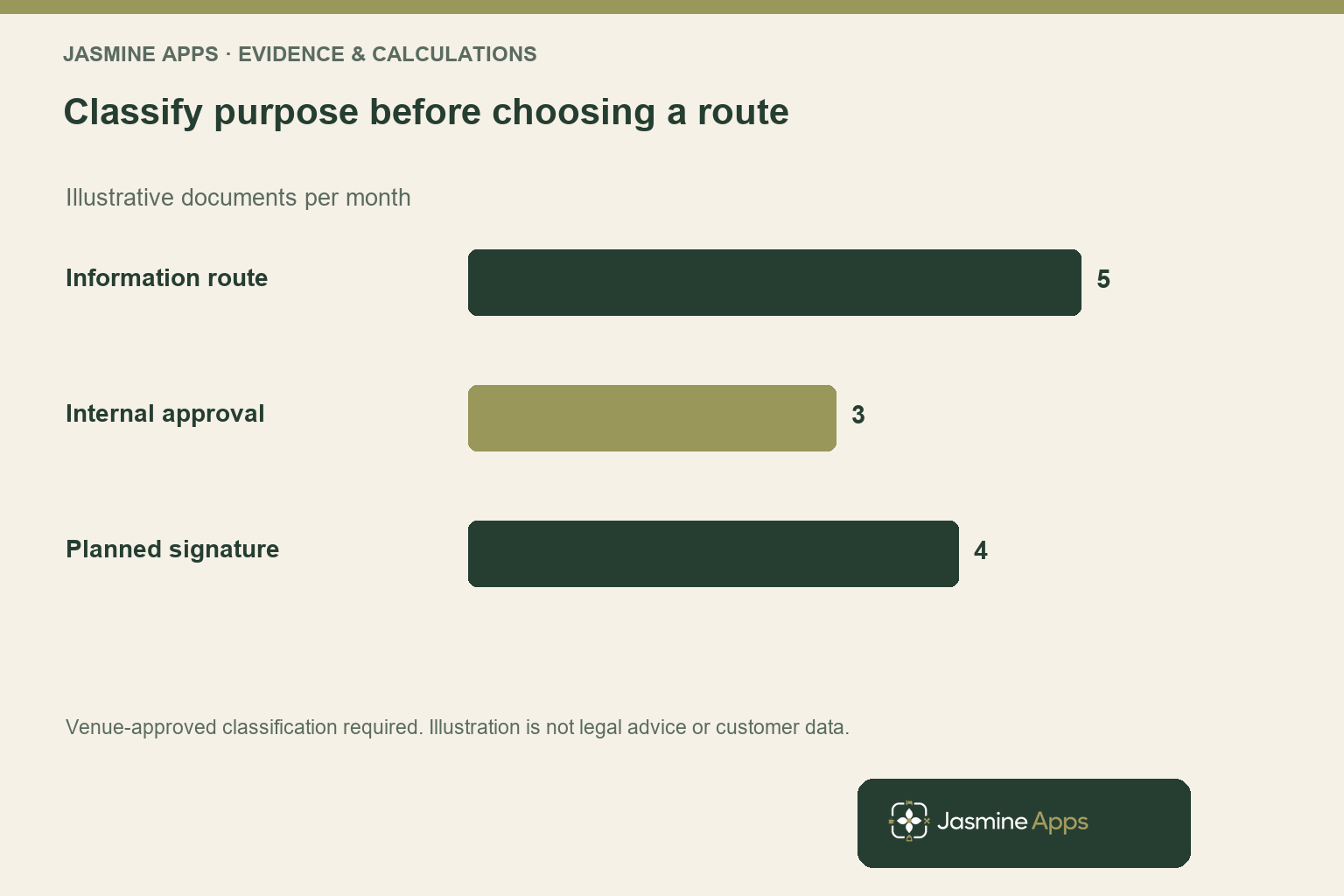
Consider an illustrative monthly inventory of twelve documents: five intended for information, three requiring an internal approval route and four requiring a planned signature route. Your venue must approve the classifications for its actual documents. These figures are not legal advice or data from a real hotel.
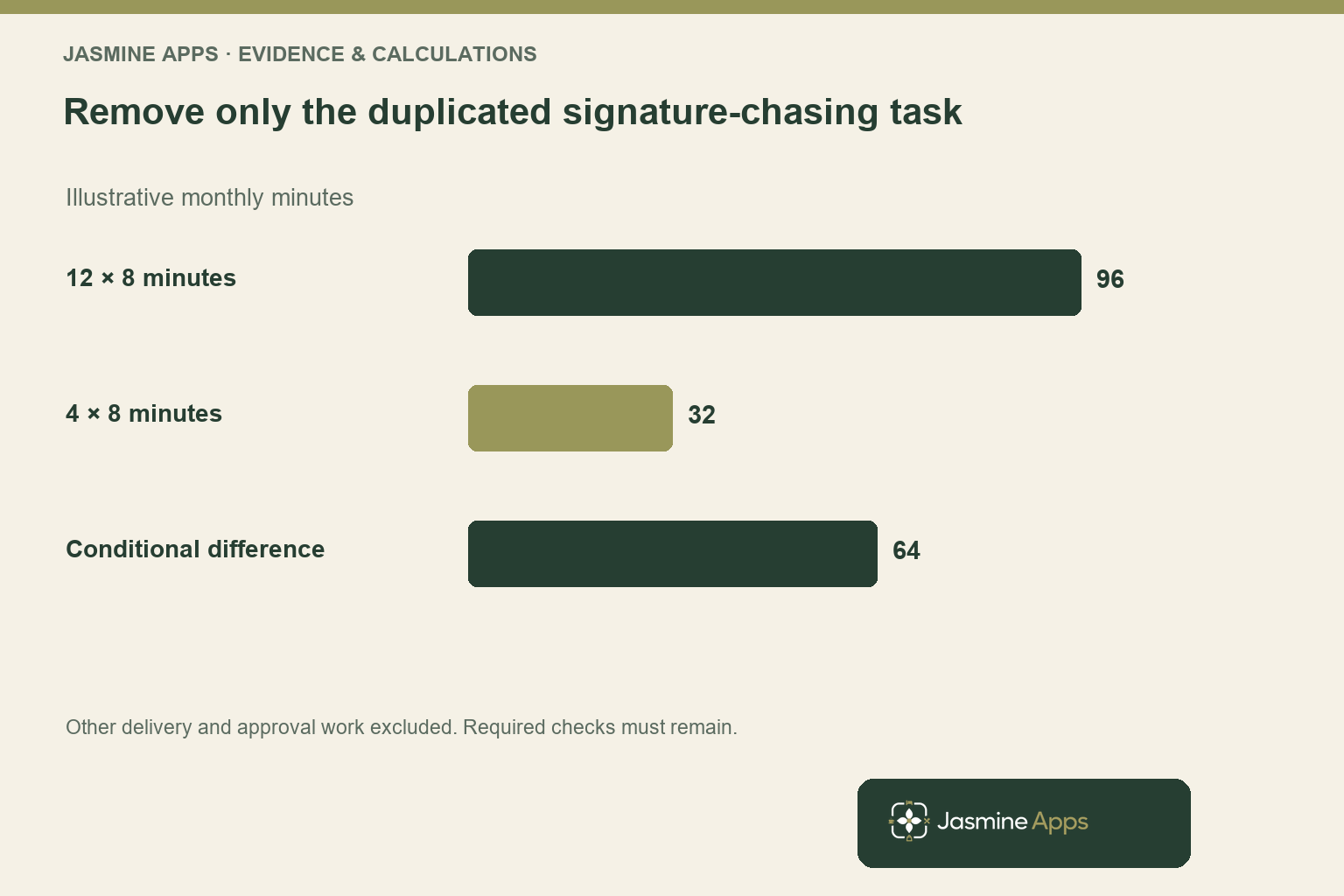
Suppose an unnecessary generic signature-chasing task takes eight minutes per document. Applying it to all twelve uses ninety-six minutes, while applying that specific task to the four approved signature-route documents uses thirty-two. The conditional difference is sixty-four minutes in the defined task.
That calculation excludes the separate time needed for appropriate information delivery and internal approval. It therefore shows a routing question, not a complete processing-cost saving. Your real audit should include those other stages before making a financial claim.
At an assumed £18 hourly value, sixty-four minutes represents £19.20 of capacity. It becomes a cash saving only when your venue can identify a corresponding expense reduction. You may instead use the time for a more useful guest or approval conversation.
You should also check whether the route leaves a dependable record. A shorter process that loses the authorised decision or final version may create more work later. Your measure needs both the avoidable chasing task and the quality of the completed document journey.
Build your hotel agreement workflow around demonstrated roles
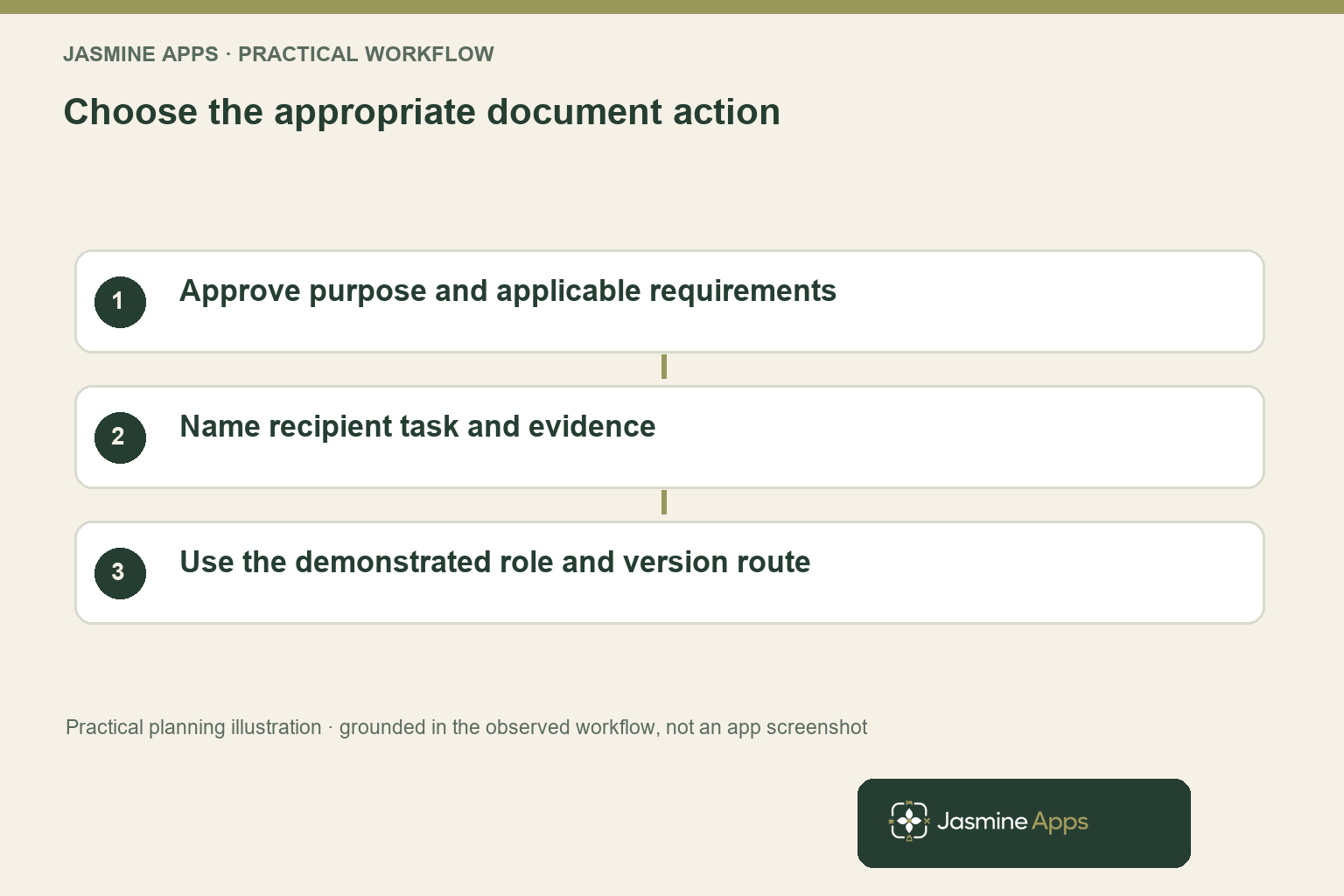
The live Sign admin supports signer, counter-signer and viewer roles, with recipient ordering. It also separates draft, sent, in-progress, completed and voided document states. You should ask for a demonstration showing how those controls support the route your venue has approved.
Do not treat a viewer role as automatic proof of acknowledgement or an internal approval decision. Confirm what the actual system records and what your policy requires. Different recipient actions can have different evidence needs, so the role name alone does not establish the outcome.
Use the PDF, title and message together to make the task clear. Your recipient should know whether the document is for review, information or signature, and whom to contact with a question. Avoid an instruction in the message that contradicts the status or content of the attached document.
Your approval stage should resolve the final scope before the signature route begins. If an internal reviewer changes the package or terms, the final version needs to reflect that decision. Ask how replacement, correction and retained records work rather than assuming a sent document updates invisibly.
For the commercial question itself, read the event agreement-objections article. Your route audit can organise responsibility, but it does not answer a guest’s unresolved question about inclusions or a requested change.
Keep access and record retention within your venue’s approved process. Demonstrate with fictional recipients and neutral documents so you can inspect the controls without exposing private agreements. Your useful purchase test shows the entire route and its exceptions, not just a successful signature on an ideal sample.
Use the route audit to choose a practical signing scope
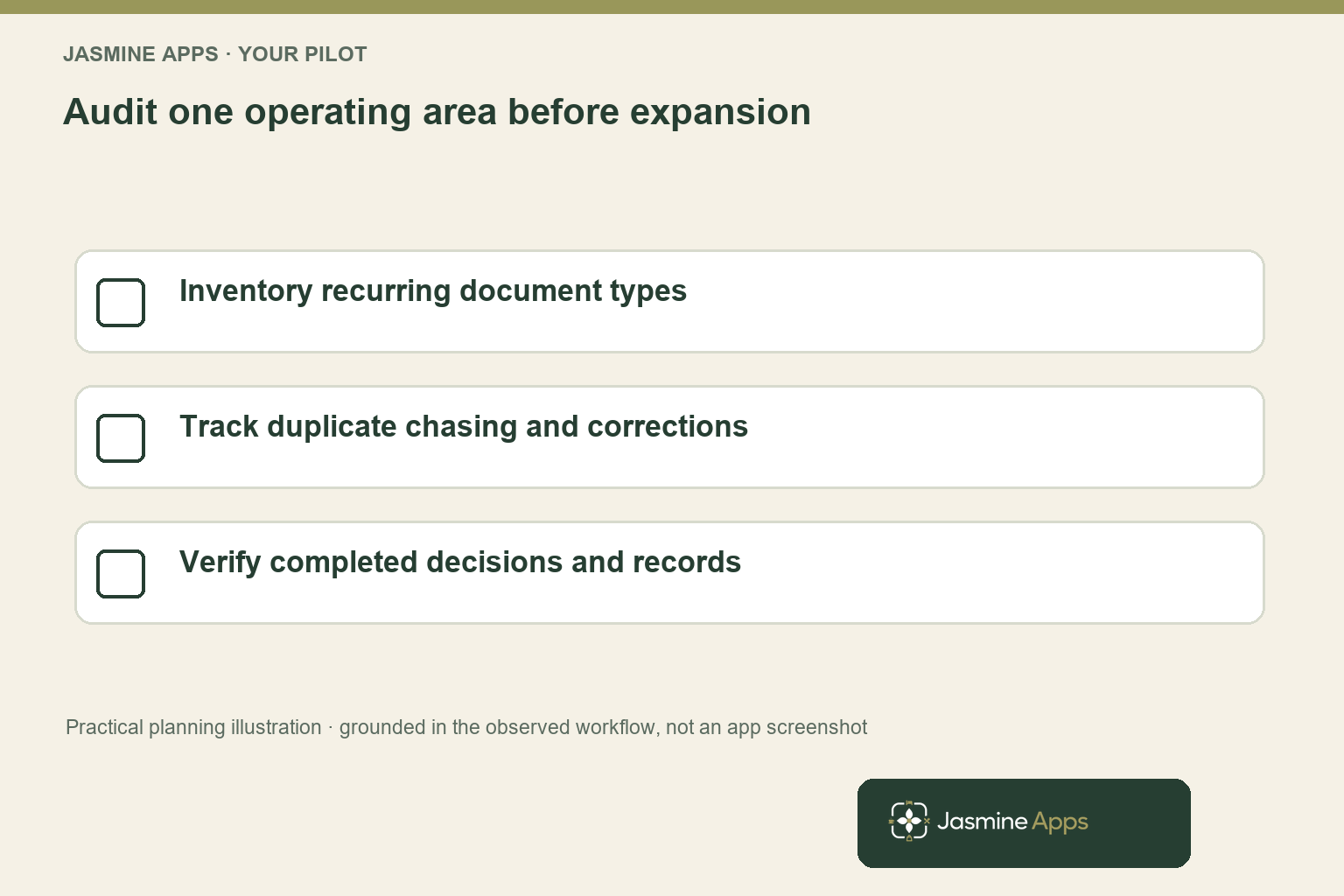
Choose a small inventory from one operating area, such as events or supplier administration. Have the responsible person approve the purpose and route for each document. You can then identify which stages the proposed tool should support and which remain in another approved process.
Record avoidable chasing, version corrections and unclear recipient instructions during the baseline. After the route changes, check whether the required decision and record are still complete. Your pilot should never remove a necessary formality simply to improve the processing-time result.
The CRM lists Sign Jasmine at £15 per venue monthly or £150 annually, with unlimited documents in the listed commercial scope. Your quotation should confirm tax, setup and relevant deployment details. That allowance does not mean every document type has the same legal requirements or that the app validates your classification.
Your buying decision should consider the document work that remains after the audit. A smaller, clearer signature route may make the tool easier to use even when not every PDF belongs in it. Your team can focus its demonstration on the agreements that need the supported role and record structure.
Use the staff-access review when you assign responsibility for the workflow. Confirm who can prepare, approve and send the document in the actual deployment, rather than granting everyone the same access for convenience.
Before expanding, keep a written route rule and a review date for each recurring document type. Changes in the transaction, venue policy or applicable requirements may require a different process later. A clear inventory makes that review possible without rebuilding the whole document system from memory.
Pro Tips
Define the recipient action. Use a plain-language task for each stage. Your recipient should not have to infer whether you need review, approval or signature.
Audit duplicated work. Look for repeated routing and contradictory instructions. Removing required checks is a different and inappropriate shortcut.
Confirm the evidence. Ask what a viewer, approver or signer action actually records. Your policy needs an outcome, not merely a role label.
Common Mistakes
Sending every PDF for signature. You add chasing without establishing the document’s purpose. Have the responsible person approve the appropriate route.
Treating the app as a legal classifier. You assume software decides formalities and validity. Review the actual transaction and relevant requirements.
Measuring only processing time. You can lose the required decision or record while appearing faster. Check completeness and the final version alongside time.
Frequently Asked Questions
Does every hotel document need an electronic signature?
You should decide the document’s purpose and applicable requirements through your venue’s responsible process. Information delivery, internal approval and a signature can be different tasks, and some documents need several stages. A PDF format or filename does not establish the required route.
Use appropriate advice for the actual transaction and formalities. Your software can support the approved workflow without automatically classifying the legal effect of every document.
What is the difference between approval and signature?
You should define the distinction in your specific process. An internal approval may authorise a final scope or decision before a document goes to another party, while a signature can be part of executing the final agreement. The relevant formalities depend on the transaction.
Do not assume a role label establishes either outcome automatically. Your demonstration should show the action, record and version that your approved process needs.
Are electronic signatures valid for hotel agreements?
You should assess the particular agreement and its applicable formalities. The Law Commission explains that electronic signatures can execute documents when authenticating intent and relevant requirements are satisfied, but that does not make every document or term valid automatically. Your responsible person should review the transaction and seek appropriate advice where needed. Test the signature workflow and retained record after that review rather than using software as a substitute for it.
Can a viewer role prove someone approved a document?
You should not assume viewing and approval are equivalent. Confirm what the actual system records for the role and what your venue’s policy requires for an authorised decision. Your process may need a separate approval action or record.
Bring the specific evidence requirement to your demonstration, then follow the whole route from draft to final version. A useful workflow makes the intended recipient task and its outcome clear.
How can you reduce document chasing in a hotel?
You can begin by classifying recurring documents, making the recipient task explicit and keeping the final version consistent with the approved scope. Record duplicated contacts and unclear handovers, then test a focused route change. Preserve required checks and formalities while removing avoidable repetition. Your review should measure completed decisions and reliable records as well as time, so a faster process does not simply transfer uncertainty into a later dispute.
Hotel agreement workflow: your next step
Your hotel agreement workflow should ask for the right action at the right stage. Request a Sign Jasmine workflow demonstration with a small, neutral document inventory and your approved route requirements. You can inspect the roles and records, confirm the price and reduce unnecessary chasing while retaining the review your venue needs.