

Event Agreement Objections: Answer the Question Before You Send
· Jasmine Apps

Your signing link can work perfectly while the guest still refuses to proceed. If the proposal leaves a price inclusion or change condition unclear, a smoother signature screen will not answer the commercial question. Your event agreement objections should be resolved before you interpret a stalled document as a technology problem.
Sign Jasmine can organise the document-and-recipient workflow. You should pair that process with a clear, approved proposal that gives the guest enough information to decide.
Key Takeaways
- Separate commercial uncertainty from signing usability.
- Classify repeated questions about price, dates and changes.
- Use approved explanations before sending the final proposal.
- Keep the document version aligned with the agreed scope.
- Measure useful resolution rather than pressure for a faster signature.
Identify event agreement objections before sending the document
You should review the questions your event team answers repeatedly. A guest may want to know what the price includes, whether a particular date is reserved or what happens if the party size changes. Those are decision questions, not necessarily reluctance to use an electronic signature.
Classify them by subject so you can improve the proposal. Your categories might include inclusions, dates, change arrangements and who is authorised to sign. Use your own enquiries rather than copying an assumed list of industry objections that may not fit the event you sell.
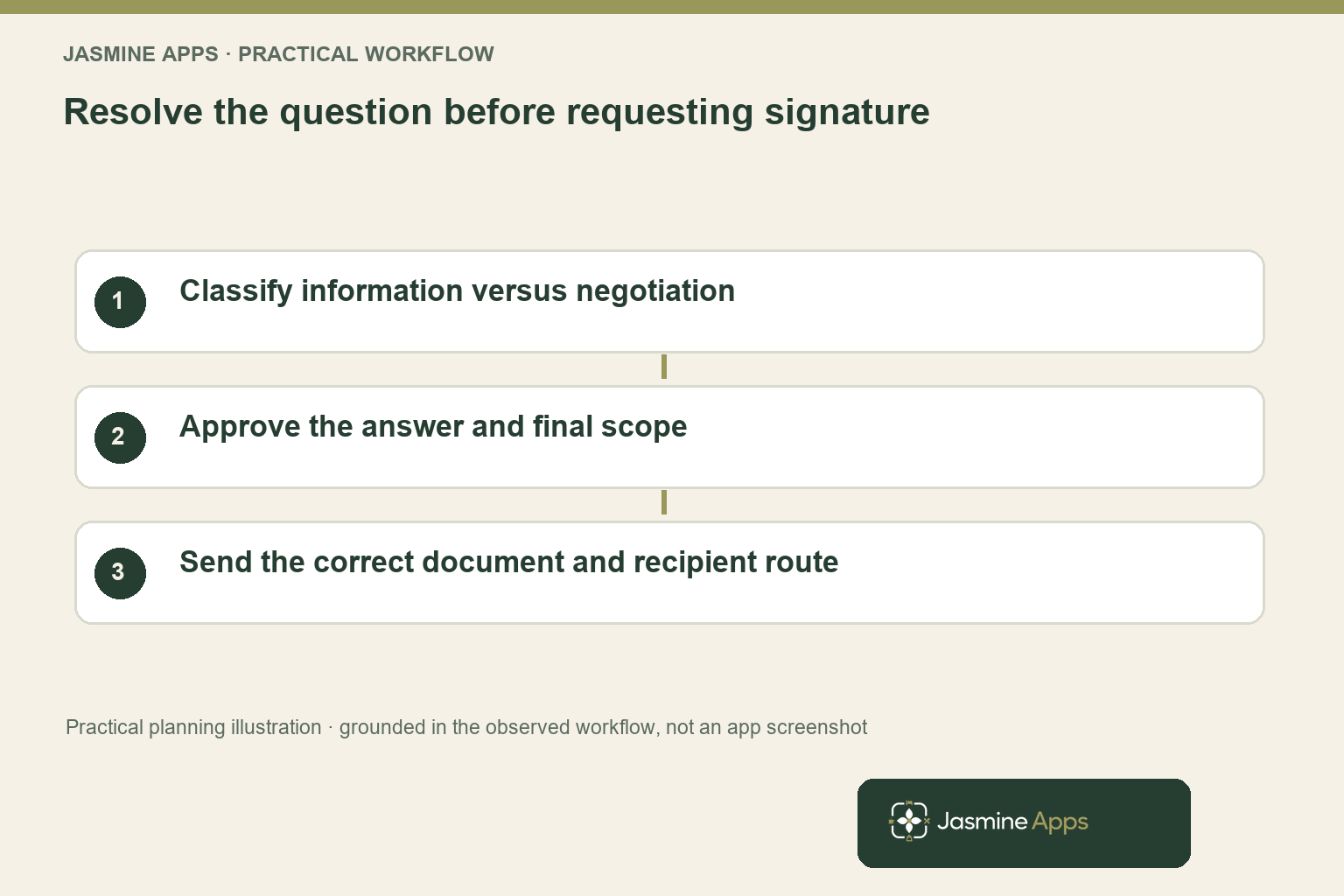
Keep a distinction between a genuine question and a negotiation. A guest asking whether drinks are included needs a clear factual answer; a guest requesting a different package needs an approved commercial decision. Your team should know who can resolve each kind of issue.
The CMA consumer-contract guidance addresses fair and transparent consumer terms. You can use it as relevant context when your guest is buying as a consumer, while recognising that business-to-business events can involve a different legal context. Clear wording alone does not establish that every term is enforceable.
Your approved explanation should lead back to the proposal rather than create a second informal version in messages. If the package changes, your final document should reflect the authorised decision before it is sent for signature. A helpful conversation should not leave the guest comparing incompatible promises.
This article addresses the commercial questions before sending. Keep your existing mobile-PDF and signing-link usability guide for guests who understand the proposal but struggle with the interface. Those problems require different fixes and should not be merged into one generic follow-up sequence.
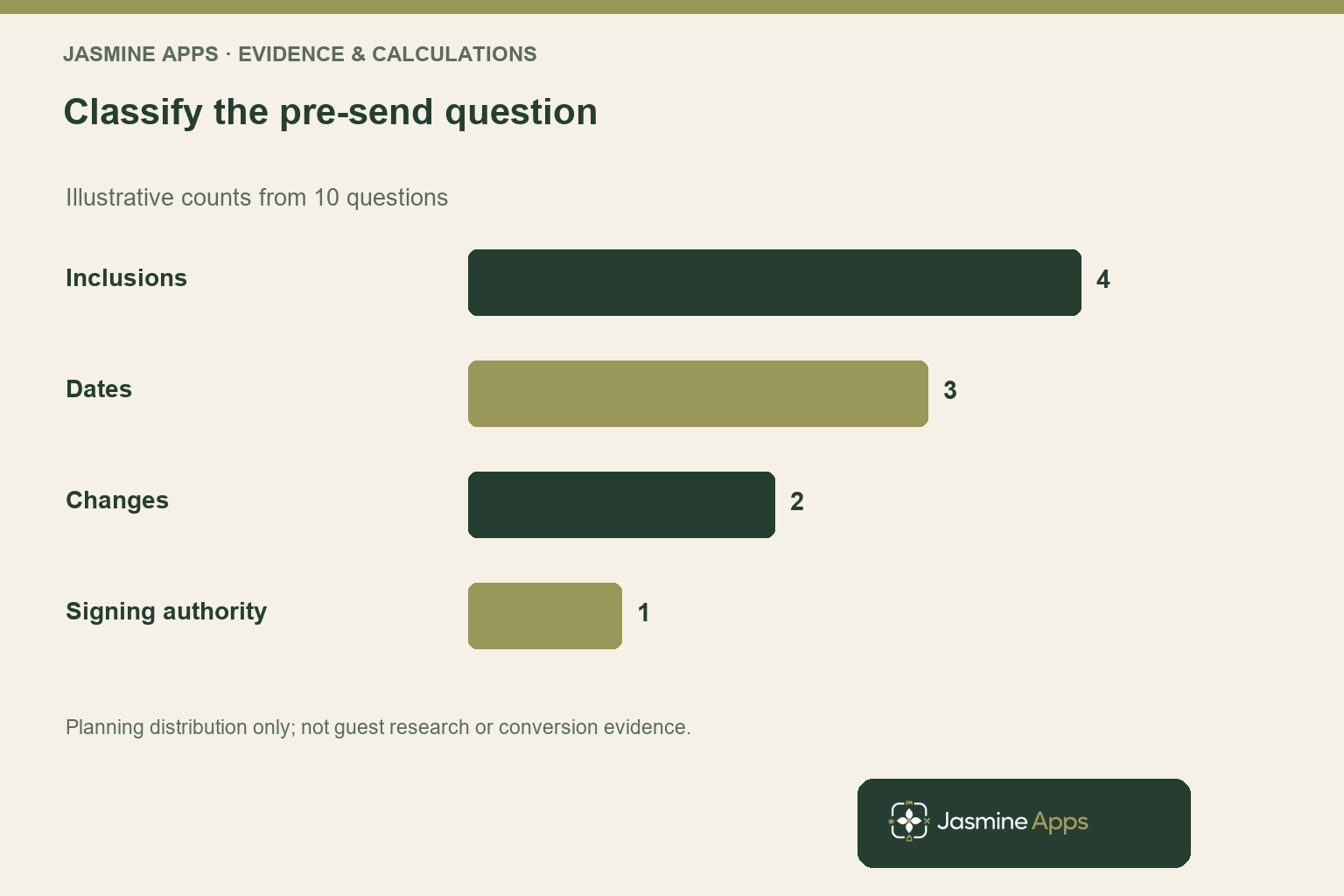
Rank event agreement objections without inventing conversion proof
Your event team can record the subject of each repeated question and the work required to resolve it. Start with a simple classification rather than a speculative conversion-rate promise. A useful pattern tells you what the proposal or approval process should explain more clearly.
For an illustrative group of ten unresolved questions, suppose four relate to inclusions, three to dates, two to changes and one to signing authority. That arrangement shows how to prioritise a review. It is not customer research, a published industry distribution or data from the Jasmine admin.
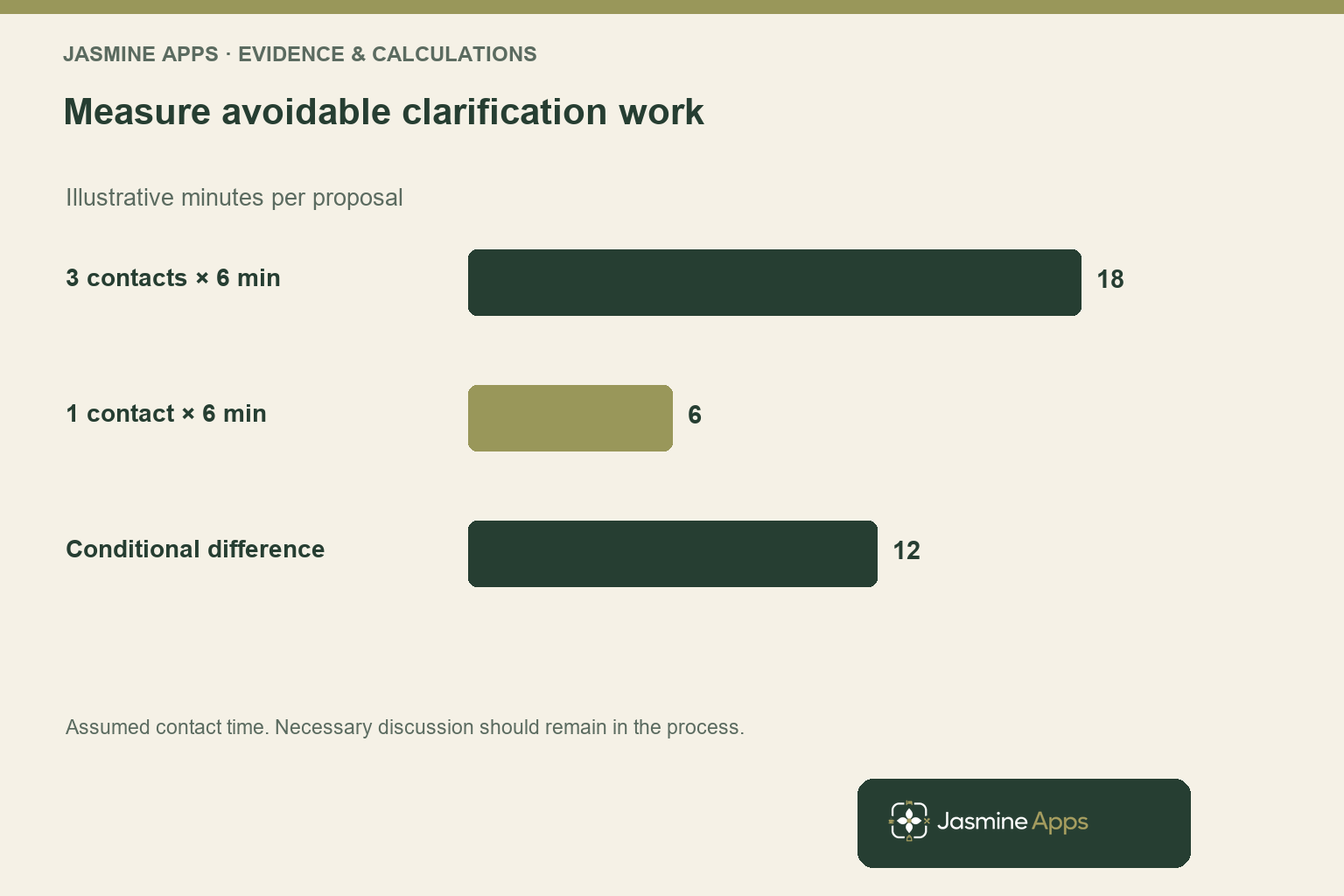
You can then estimate the coordination task you want to reduce. If a proposal currently needs three six-minute clarification contacts, the defined work is eighteen minutes. If an approved explanation reduces it to one six-minute contact, the illustrative difference is twelve minutes per proposal.
That time model is conditional, not a guaranteed Sign Jasmine saving. The guest may need a legitimate detailed discussion, and your team should not discourage it to improve a metric. Your target is avoidable repetition after an answer has already been approved.
Track the quality of the resolution alongside the time. Ask whether the guest understood the final scope, whether the document changed and whether staff needed to correct an earlier explanation. A quicker signature achieved through pressure or ambiguity does not create a dependable agreement.
You should also separate inquiry volume from successful event sales. A clearer proposal may support the decision, but price, availability and the event experience still matter. Your commercial review should describe what the evidence establishes instead of attributing every completed event to the document tool.
Resolve event agreement objections within an approved document workflow
Your proposal should make the event scope understandable before the signing task begins. Put the relevant package, date, price basis and approved change arrangements where the guest can find them. Your venue’s responsible person should approve the content and legal terms appropriate to the transaction.
The live Sign admin supports a PDF, title and message, then recipient roles such as signer, counter-signer and viewer with an order. It also provides document states including draft, sent, in progress, completed and voided. Those controls help organise the workflow, but they do not decide whether your commercial explanation is complete.
Use the message to tell the guest what they are reviewing and where to ask a question. Do not introduce a new price condition there that contradicts the PDF. Your final proposal and supporting communication should describe the same approved arrangement.
If a question leads to a material change, follow your approved version process before requesting a signature. Confirm the live handling of corrections and replacement documents rather than assume a sent PDF silently updates for every recipient. Your guest should know which version requires their attention.
Read the document version-control article for the wider record discipline. Your pre-send review should prevent an unresolved commercial conversation from being hidden inside a polished signing workflow.
You should also confirm recipient authority for the specific event. The person coordinating the party may not be the person your approved process requires to sign. Resolve that question respectfully before sending, and use the relevant role settings rather than treating every contact as an interchangeable signer.
Test the pre-send process with your event team
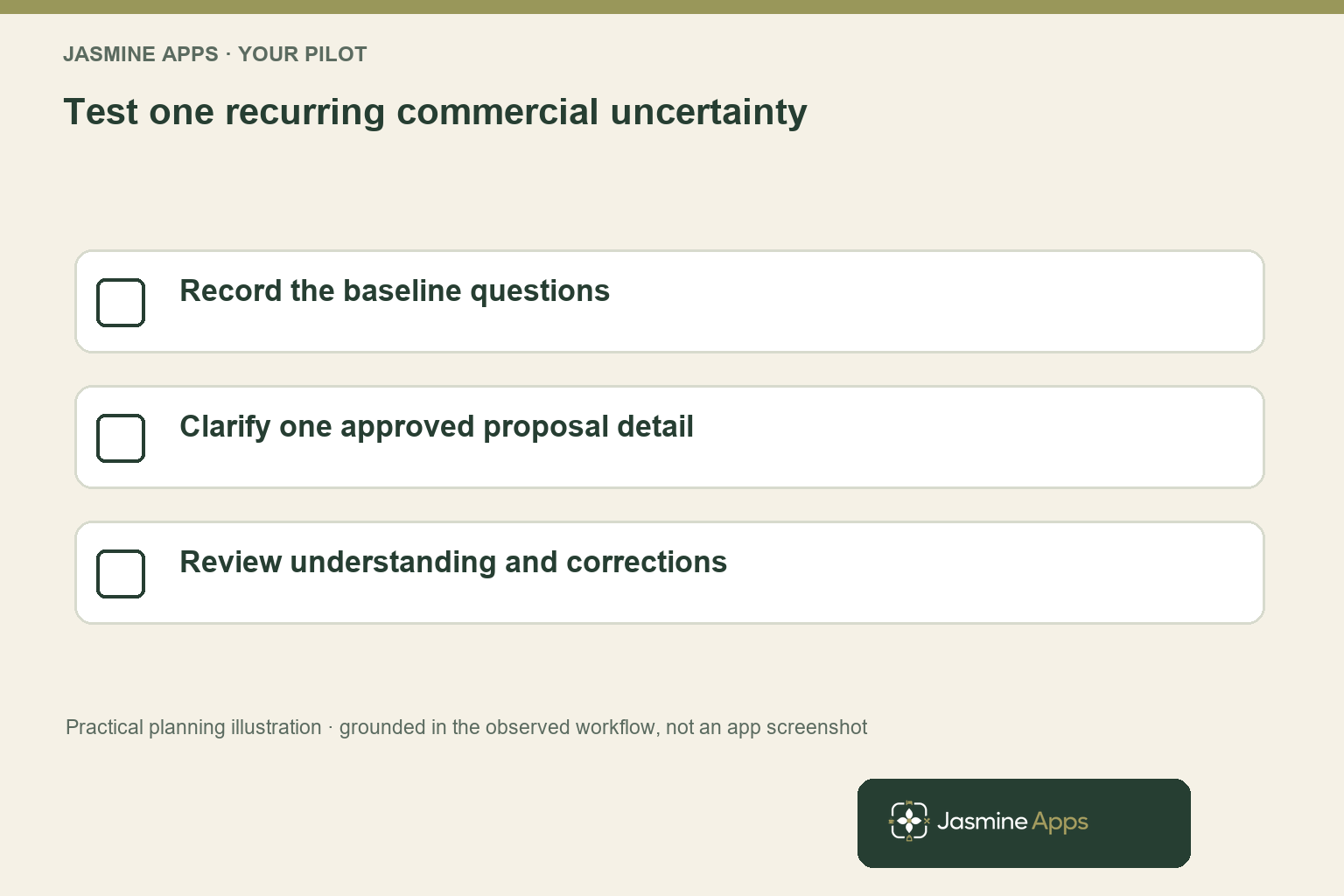
Choose a small set of representative proposals and classify the questions that arise before sending. Ask your event coordinator which answers are routine and which require a manager’s decision. You can then improve the approved explanation without turning every enquiry into a lengthy new template.
Keep the first pilot focused on one recurring question. For example, clarify what a package includes and check whether guests still ask the same question. Avoid changing the price, package, terms and signing sequence simultaneously if you want to understand which improvement helped.
The CRM lists Sign Jasmine at £15 per venue per month or £150 per year, with unlimited documents in the listed scope. Your quote should clarify tax, setup and any relevant deployment details. Unlimited documents does not mean every document type follows identical formalities or that software validates every term.
Your review should measure clarification contacts, corrections and guest understanding. You can also record the final document state, but a completed signature is not the only useful result. Identifying an unsuitable package before commitment may prevent a later dispute or service failure.
Use the hotel agreement-workflow article to decide which internal review and signature route each document needs. That broader route audit is separate from resolving the commercial question in a particular event proposal.
Before expanding, ask the team whether the revised process makes a difficult conversation easier. Your purchasing recommendation should show the approved document sequence and the measured reduction in avoidable repetition. That gives a decision maker a practical reason to investigate the product without a fabricated promise that every objection will disappear.
Pro Tips
Classify before persuading. Ask whether the guest needs information, an authorised change or a signing fix. Your response should address the actual problem.
Keep one approved promise. Update the final proposal when the scope changes. Your message should not become a competing version of the agreement.
Measure useful resolution. Track understanding and corrections as well as contacts. A fast signature with an unresolved question is not a strong outcome.
Common Mistakes
Blaming the signing link for a price question. You improve the wrong part of the journey. Resolve the commercial uncertainty before changing the interface.
Making unofficial concessions in messages. You can create inconsistent expectations and versions. Use the venue’s approval process and final document.
Treating unlimited documents as unlimited legal suitability. You confuse a commercial allowance with formalities and valid terms. Review the actual transaction through the appropriate responsible process.
Frequently Asked Questions
Why do guests hesitate to sign an event agreement?
You should check whether the hesitation comes from an unclear commercial detail, an unresolved change request, signing authority or interface difficulty. Those causes need different responses. A guest who does not understand what the price includes will not gain that understanding from a faster signing screen. Classify the question, use an approved answer and align the final proposal before sending the document through your signature workflow.
What should an event proposal clarify before signature?
You should make the approved scope, relevant date, price basis, inclusions and change arrangements understandable for the actual event. Your responsible person should review the terms and legal context appropriate to the transaction. Keep messages consistent with the final document, and identify who your process requires to sign. A useful pre-send review answers the repeated decision questions without implying that clear wording alone guarantees every term is valid.
Can electronic signatures resolve event sales objections?
Your electronic-signature workflow can organise review and signing, but it does not answer every commercial objection. You still need an approved explanation or decision about the package, timing or requested change. Use the tool after the relevant scope is clear, then demonstrate the actual recipient and document sequence. You should measure clarification quality and final understanding rather than assume a completed signature proves the sales conversation was effective.
How should you handle a change after sending an event PDF?
You should follow your approved document-version process and confirm how the live system handles the change. Do not assume a sent PDF silently updates for every recipient or that an informal message replaces the relevant document. Make the authorised scope and version clear before asking for further action. Your demonstration should show the correction or replacement workflow you need, with recipient communication and retained records considered together.
What does Sign Jasmine cost for event agreements?
The CRM lists £15 per venue per month or £150 annually, with unlimited documents in the listed scope. Your quote should confirm tax, setup and the relevant deployment details. Your purchase case can examine the avoidable document and clarification work, but should not assume software removes every negotiation or validates every contract term. Bring a representative proposal and recipient sequence to your demonstration so the workflow can be assessed concretely.
Event agreement objections: your next step
Your event agreement objections deserve a useful answer before another reminder. Request a Sign Jasmine demonstration with a representative proposal and your three most repeated guest questions. You can test the approved pre-send and signature sequence, confirm the price and make the next event decision easier for both your guest and your team.