

Staff Clock-In Kiosk Cost: What a £5 Add-On Needs to Save
· Jasmine Apps

A £5 add-on can be covered by less than 17 minutes of monthly time value at an assumed £18 hourly cost. Yet buying it on that figure alone would miss the base subscription and the tablet. Your staff clock-in kiosk cost is a small investment only when you understand the complete installation.
Clock Jasmine Kiosk gives your staff a shared workplace device for PIN clock-in, clock-out and breaks. You can use it to create a consistent arrival routine, with the real return measured in clearer records and less avoidable chasing.
Key Takeaways
- The kiosk is a £5 monthly venue extension to Clock Jasmine, not a standalone £5 system.
- The base Clock monthly minimum makes the combined software minimum £30.
- You need to include the tablet, mounting and setup you actually require.
- PIN punches still need a manager-led exception process.
- Your first pilot should test usability at the start and end of real shifts.
Put your staff clock-in kiosk cost in the right context
Your shared clock-in device solves a different problem from a customer ordering kiosk. Its purpose is to give employees a predictable place to record arrival, departure and breaks. If your current attendance process relies on messages, loose paper or supervisors asking people what time they started, a consistent routine can reduce ambiguity.
That does not mean your team will automatically save money. A record becomes useful when the right person reviews it and resolves exceptions promptly. You should identify the specific administrative task you want to reduce, such as chasing missed times at the end of a payroll period, rather than assuming every punch creates a saving.
The CRM describes Clock Jasmine Kiosk as a shared workplace tablet using personal PINs. The actual device area shows registered locations, device actions and last-seen information, which gives you a practical way to discuss whether the intended kiosk is available where staff expect it. Your demonstration should concern your staff entrance and working routine, not a generic reception display.
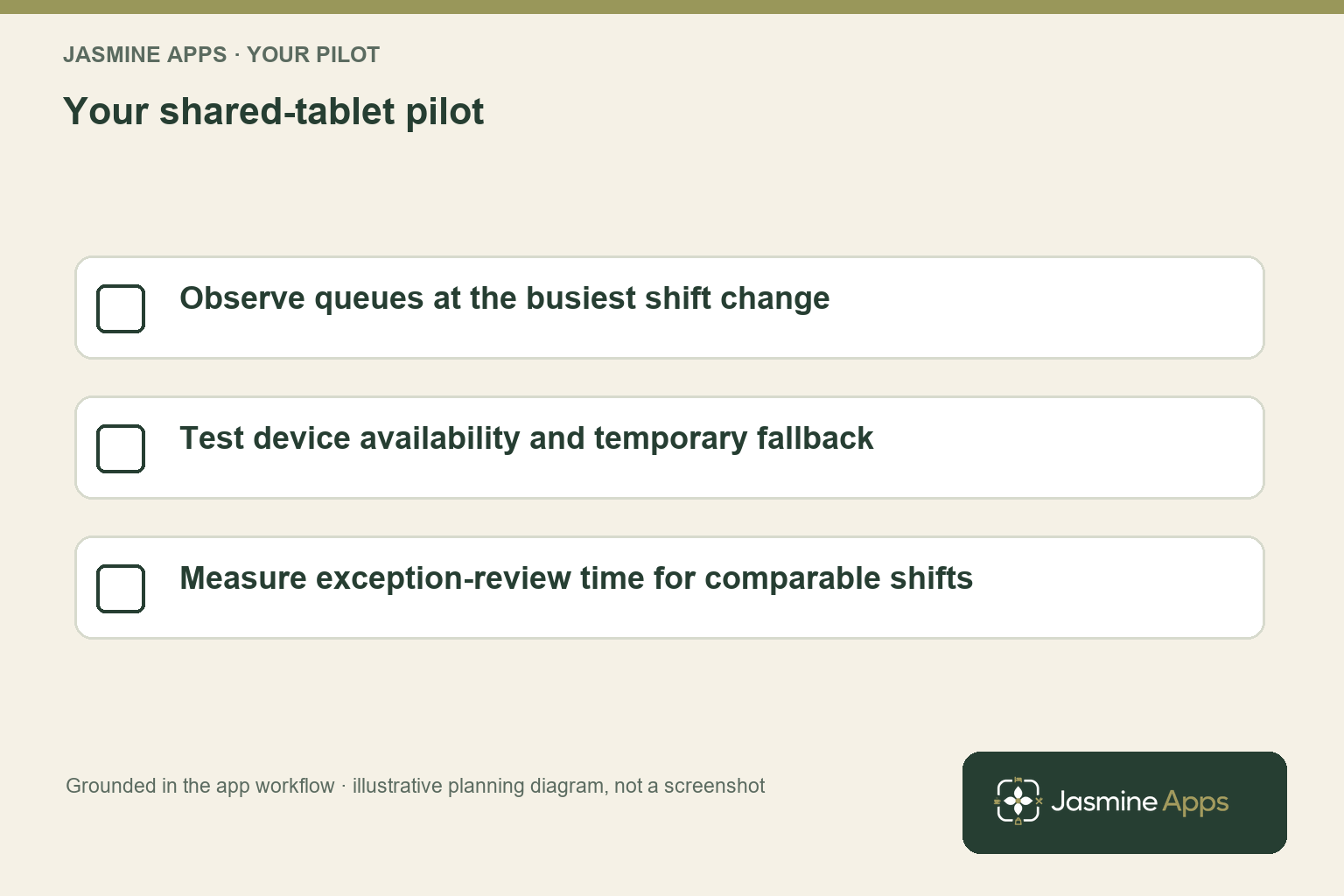
Start by observing your busiest shift change. Count how many people need the device, whether they arrive together and whether the location forces them to queue in a working corridor. Ask your supervisor how they handle a forgotten PIN or a missed clock-out today, then compare the proposed routine with that baseline.
Your useful buying question is therefore narrow: can a shared device make accurate attendance easier for your team and quicker to review? If your staff are rarely at one workplace, the shared-tablet model may need a different arrangement. A product can be inexpensive and still be the wrong fit for the way your people actually work.
Calculate your staff clock-in kiosk cost including the parent app
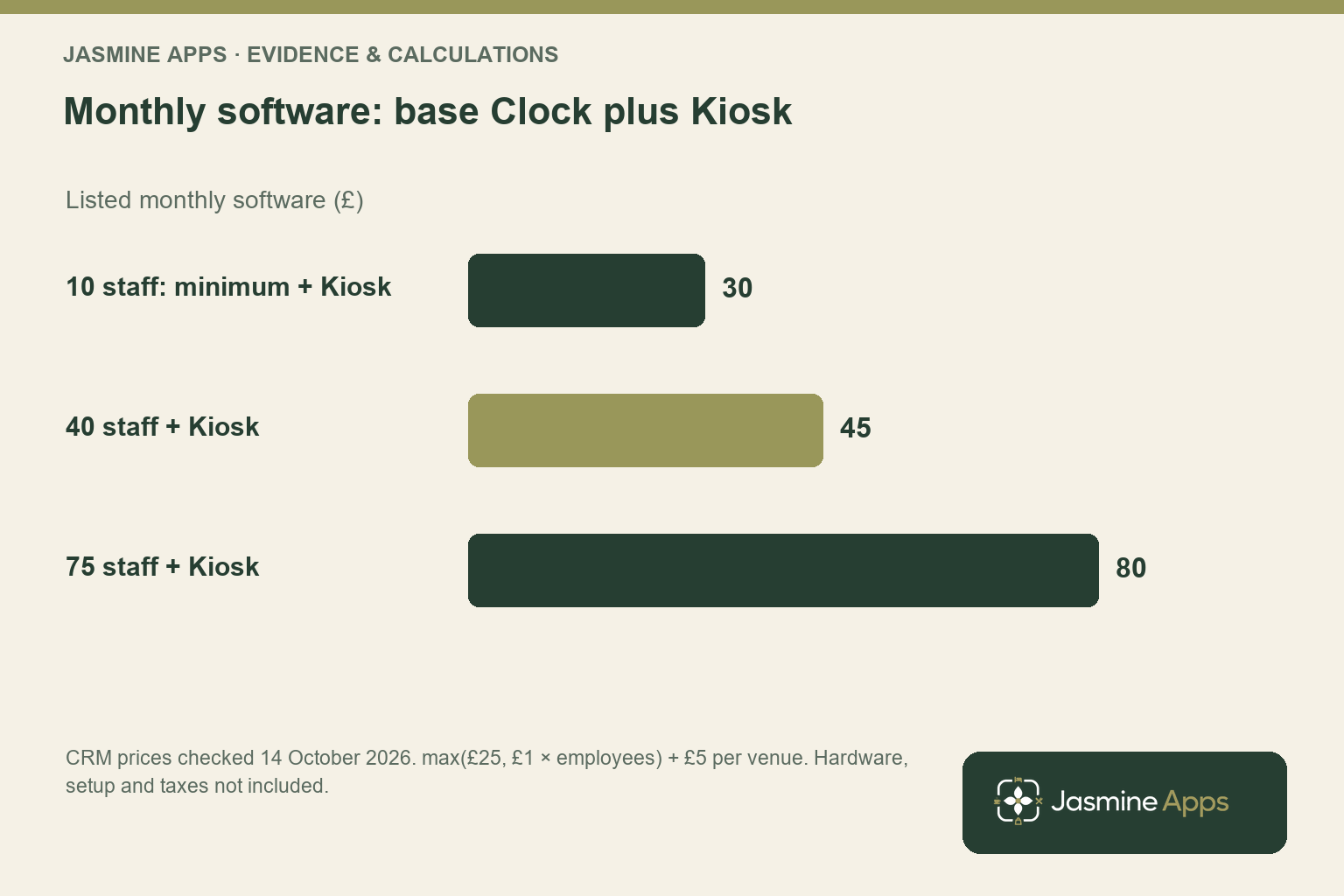
Clock Jasmine Kiosk is listed at £5 per venue per month, or £50 annually. It is an extension to Clock Jasmine, whose listed monthly rate is £1 per employee with a £25 minimum. The combined monthly software minimum is therefore £30 before other agreed costs; the add-on price should never be presented as the cost of your whole attendance system.
For 40 employees, the base app would be £40 and the kiosk extension £5, giving £45 monthly software. For 75 employees, the same arithmetic gives £80. Confirm employee-count rules, venue scope and annual minimum treatment in your quotation rather than extending the monthly wording into assumptions about annual billing.
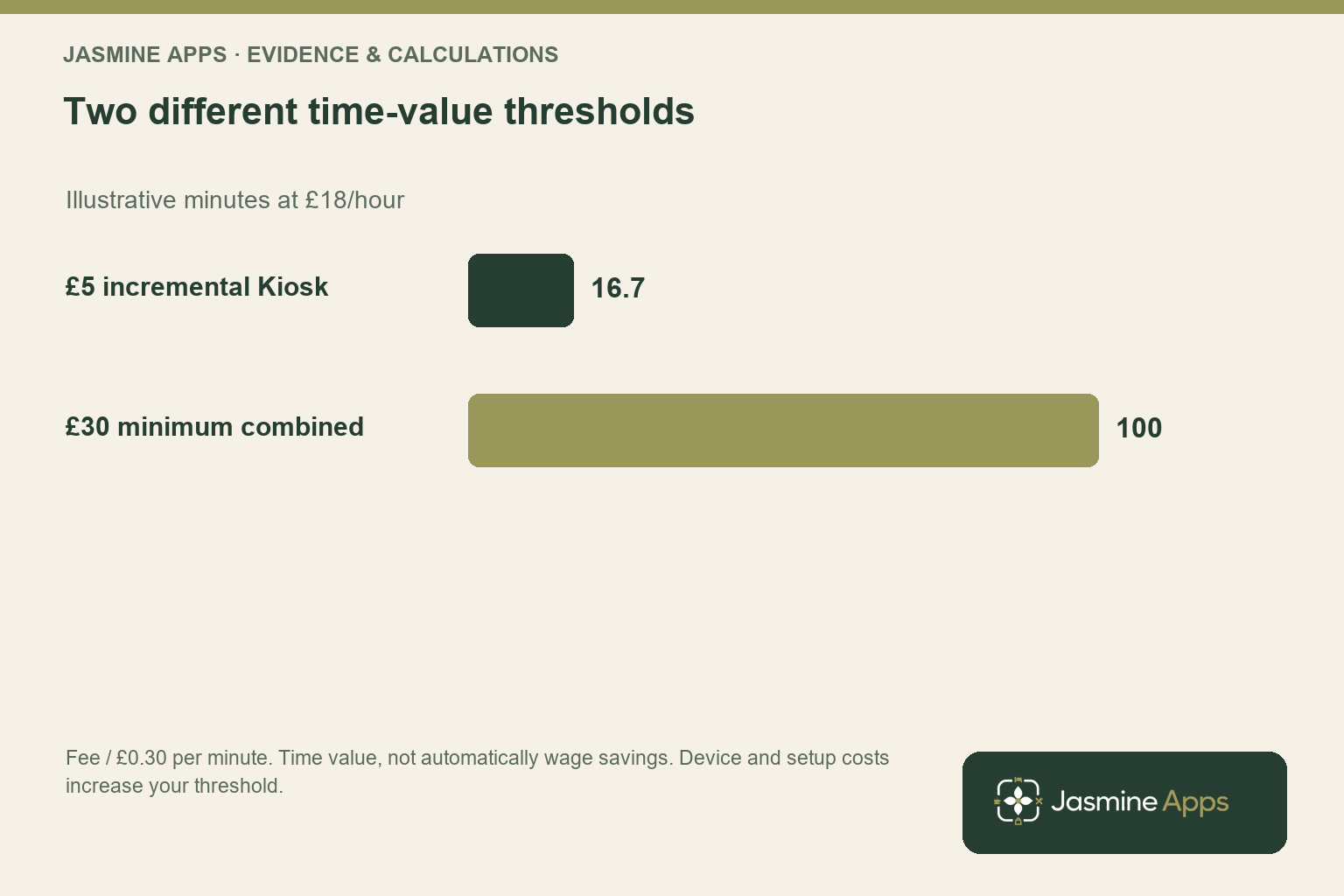
Now suppose your reviewed attendance process saves manager time valued at an illustrative £18 per hour. That means each minute is 30p. The £5 incremental kiosk fee requires 16.7 minutes of monthly value, while the £30 minimum combined software requires 100 minutes; they answer different purchasing questions.
If you already use Clock Jasmine, you can assess the incremental kiosk decision against the £5 plus any new equipment and setup. If you are buying both together, you need to assess the full combined cost. This avoids comparing the extra feature with a benefit that actually depends on the base app as well.
Your tablet, secure mounting, power arrangement and replacement policy can matter more than a small software charge. Obtain the actual equipment and setup quote and spread one-off expenditure over your chosen comparison period. The public terms leave fees and taxes to your order, so confirm these rather than presenting a device price or installation charge that has not been agreed.
Test staff clock-in kiosk cost against the arrival workflow
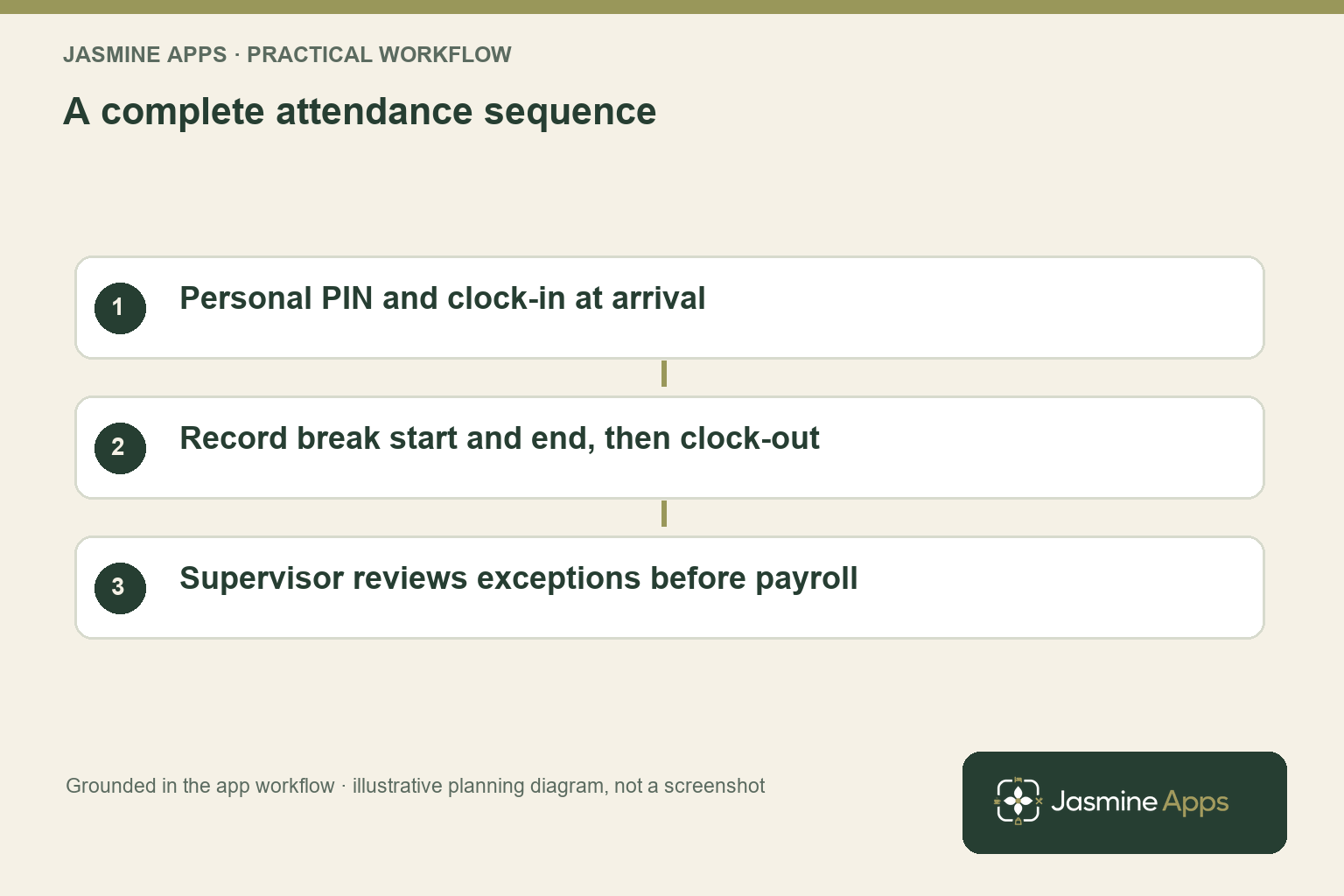
Ask for a demonstration on the type of device you intend to use. Your staff should be able to identify the kiosk, enter their own PIN and select the correct attendance action without receiving a long explanation. The point is to make a routine action straightforward during a busy shift change.
Test clock-in, a break start, a break end and clock-out as separate events in an agreed demonstration environment. Then inspect the resulting time record with your supervisor. You want to see that the recorded sequence makes sense, not simply that a button responded to a tap.
Your exception test is just as useful. Ask what happens when someone forgets to clock out, returns from a break late or uses the wrong action. Agree who reviews the record, how you record the explanation and what information reaches payroll approval. Your system should help you resolve uncertainty instead of hiding it behind a total.
Check the location and last-seen device information during your demonstration. A tablet mounted neatly by the staff entrance can still be unavailable because of power, connectivity or a local configuration issue. Ask your team how they will record attendance temporarily when the device is unavailable, and how you will reconcile that record afterwards.
Your kiosk also needs a sensible access routine: staff should use their own PIN rather than sharing one convenient code. Keep device setup credentials out of public instructions and only perform registration through your authorised administrator. These practical details protect the usefulness of your attendance records and make the small monthly cost easier to justify through a reliable process.
Prove the value without turning minutes into imaginary savings
A short pilot should cover the shifts where your existing process causes the most chasing. Record how many attendance exceptions your supervisor resolves, how long that takes and how many need a second conversation. Keep ordinary usage separate from installation and first-day training so you can see the ongoing routine clearly.
Compare similar staff counts and working patterns. A quiet week with fewer shifts will produce less administrative work even without a kiosk. Your measurement should concern minutes per comparable review task, the number of unresolved records and the delay before the supervisor receives the information they need.
You can use the resulting time estimate to assess capacity. If your manager avoids 30 minutes a month at the illustrative 30p-per-minute rate, that represents £9 of time value. It exceeds the £5 incremental extension fee but does not cover a £30 combined software minimum or new tablet cost; your decision depends on which investment you are evaluating.
If the manager’s salary stays the same, describe the improvement as capacity released. You might use that capacity for staff support, service preparation or more timely attendance review. Only count a payroll saving when paid expenditure genuinely falls, and avoid making the same minute appear in both the base Clock and kiosk business cases.
At the end, ask your staff whether they can complete the routine confidently and ask your supervisor whether records are easier to resolve. If the answer is yes and the complete quoted costs fit your threshold, you have a practical reason to adopt it. If your bottleneck is elsewhere, adjust the workflow before buying more devices.
For the related operating detail, read your guide to staff clock-in tablet placement before the demonstration.
Pro Tips
Evaluate the incremental decision. If you already subscribe to Clock, compare the kiosk with only the costs and benefits it adds. If you are new to both, use the whole combined investment.
Place the tablet where work begins. Observe arrival patterns before choosing the mounting point. A convenient location helps staff form a consistent routine without creating a shift-change queue.
Review exceptions promptly. Resolve missed punches while staff and supervisors remember the shift. Your records become harder to explain when queries accumulate until payroll day.
Common Mistakes
Advertising a £5 complete system. The extension requires the parent app. Omitting the Clock minimum misrepresents the starting software cost.
Sharing PINs for convenience. Shared credentials weaken the meaning of the attendance record. Your team should use the personal identification routine intended for the kiosk.
Ignoring device downtime. A tablet still needs power, connectivity and a fallback. Without an agreed temporary record and reconciliation process, you create gaps instead of clarity.
Frequently Asked Questions
How much does a staff clock-in kiosk cost?
Your Clock Jasmine Kiosk extension is listed at £5 per venue per month, or £50 annually. It requires Clock Jasmine, whose monthly software minimum is £25, so the combined minimum is £30 before equipment and other agreed costs. Include a suitable tablet, mounting, power and setup in your comparison. Ask for the applicable tax basis and annual terms so you can budget the actual installation rather than the add-on alone.
Can you use a tablet as an employee time clock?
You can use a suitable shared tablet with Clock Jasmine Kiosk for PIN clock-in, clock-out and breaks. Confirm the supported device and setup arrangement before buying hardware. Your acceptance test should cover real arrival patterns, visibility, power and the review of recorded actions. You also need an exception routine for missed punches or an unavailable device, because a tablet does not remove the need for manager review of attendance.
Is a clock-in kiosk the same as an ordering kiosk?
Your staff clock-in kiosk records employee attendance; it is not a customer self-service ordering system. The Clock Jasmine extension uses a shared workplace tablet for PIN-based clock actions and breaks. Your purchase decision should therefore focus on staff arrival routines, record review and payroll preparation. If your goal is customer ordering or payment, ask about the appropriate product rather than assuming those features are part of this kiosk.
How much time does a clock-in kiosk need to save?
At an illustrative loaded manager cost of £18 per hour, the £5 monthly extension corresponds to about 16.7 minutes of time value. The £30 minimum combined software corresponds to 100 minutes, before tablet and setup costs. Replace the hourly assumption with your own figure and distinguish capacity released from reduced expenditure. Your break-even threshold also depends on whether you already use Clock Jasmine or are buying the complete workflow.
How should you handle missed clock-outs?
You should agree a manager-led exception process before rollout. Ask how the record is identified, what explanation you need from the employee and how the reviewed information reaches payroll approval. Resolve the issue promptly while the shift is still easy to recall.
Your goal is a defensible attendance record, not an unexplained automatic total. Include this scenario in your kiosk demonstration alongside ordinary clock-in, breaks and clock-out actions. For wider record context, see GOV.UK’s payroll-record guidance.
Staff clock-in kiosk cost: your next decision
Your staff clock-in kiosk cost is easiest to defend when your team gains a reliable routine and your supervisors spend less time chasing records. Request a combined Clock and Kiosk demonstration with your employee count, tablet requirements and busiest shift-change pattern. You can leave with a complete cost and a practical attendance test for your workplace.