

How to Reduce Bar Queues: Practical Till and Service Changes
· Jasmine Apps
Find where the queue is actually forming
To reduce bar queues, start by watching the order from the guest's first request to the completed payment. The delay may be at the till, but it may also be a missing glass, a complicated drink, an unclear menu or a payment handover.
Buying another terminal will not fix every bottleneck. A useful first step is a short observation during peak service: where do staff wait, what do they search for and which decisions do they repeat?
Till Jasmine's visual designer lets managers arrange products on a preview of the real screen. Pages, folder buttons, button sizes and colours can help staff find the right item. The result still needs to be tested with the people who use it.
This guide covers practical changes you can assess in your own hotel bar, pub or restaurant. The examples are illustrations, not claimed Till Jasmine performance results.
Illustrative scene: Guests are served at an organised hotel bar during a busy evening.
Check the result: The observed bottleneck is identified.
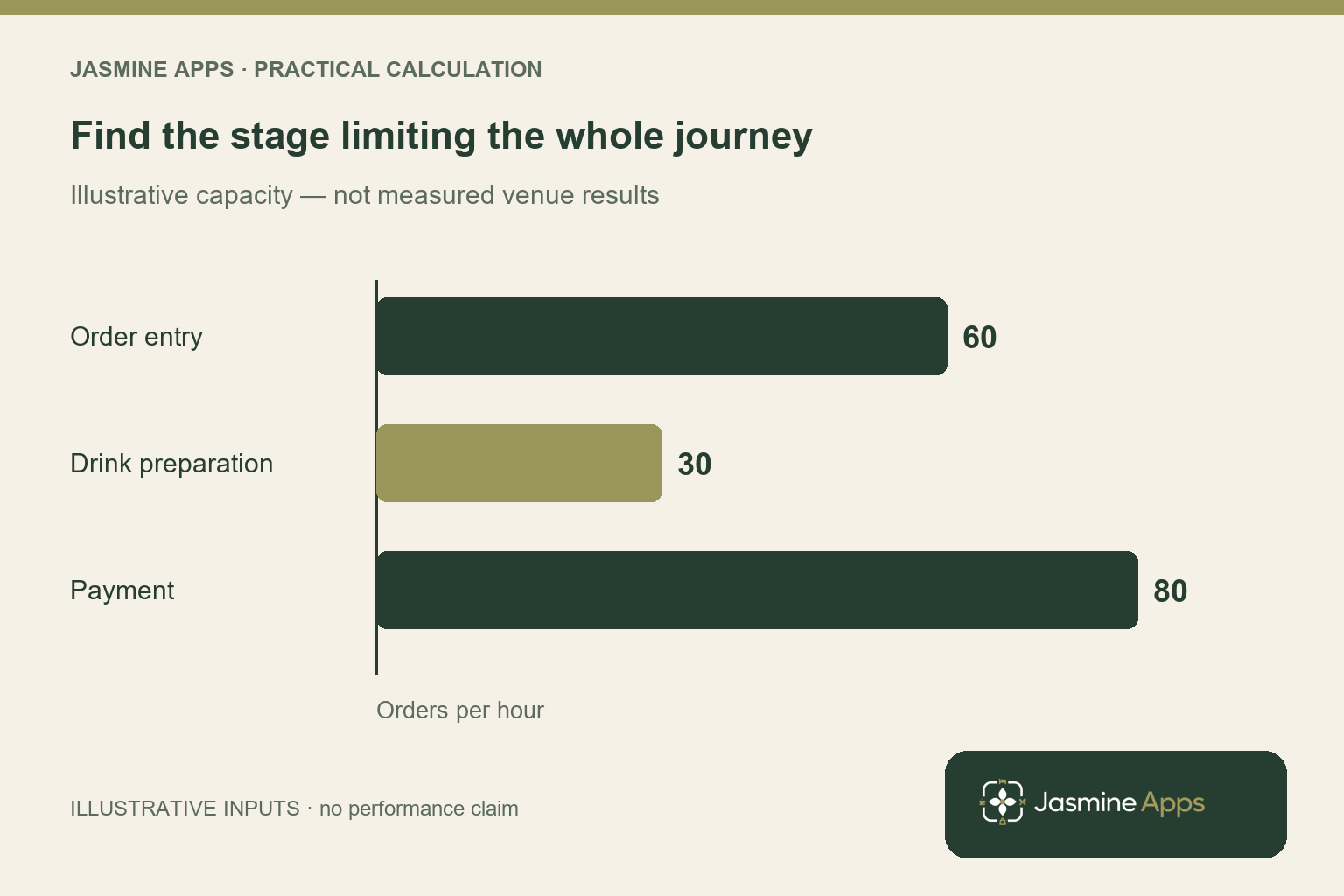
Illustrative bottleneck example: Suppose order entry can handle 60 orders per hour, drink preparation 30 and payment 80 under the same order mix. The complete journey is constrained by preparation at about 30 orders per hour. Improving entry alone will not remove that limit. These numbers explain the principle; observe your own tasks and order mix before deciding where extra staff or layout changes would help.
Measure a small sample of real orders
Watch a spread of orders during a busy period rather than selecting only the simplest pint sale. Note when the guest is ready, when staff start, when drinks are ready and when payment finishes.
| Stage | What to look for |
|---|---|
| Choosing | Unclear menu, price questions or unavailable items |
| Entering | Searching through pages, similar names or missed buttons |
| Preparing | Glasses, ingredients or equipment out of reach |
| Paying | Waiting for a terminal or an unclear handover |
| Correcting | Wrong products, duplicate orders or unclear void process |
Avoid interrupting staff with a stopwatch in a way that makes service harder. A short, consistent observation is enough to identify a starting point. Record the conditions so a later comparison is fair: staffing, menu, event and approximate demand.
Check the result: Staff locate the right item without guessing.
Put frequent products where staff expect them
Use common order patterns to decide the first screen. Make the busiest products easy to identify, then organise less-used items into groups that match the team's language.
Till Jasmine supports category folders and separate selling pages. Its layout guide describes larger buttons for best sellers and colour choices with category defaults. Use these deliberately rather than filling every available space.
Existing Till Jasmine layout-designer image from the existing screen-design guide, showing product placement, size and colour controls. Jasmine Apps branding has been added below the screenshot.
A practical arrangement might put the common draught products together, bottled drinks together and hot drinks on a named page. There is no universal best layout; a hotel breakfast counter and a late-night bar have different order patterns.
Check that names distinguish similar products. A button that only says “Wine” leaves a choice unresolved. Staff should be able to tell which product, size or serving option they are entering.
Check the result: The till is supported by a ready service station.
Use colour as a supporting cue
Consistent colours can help a team recognise groups quickly, but labels still need to make sense. Do not make colour the only way to tell two products apart.
Keep related groups consistent and avoid turning the screen into dozens of unrelated bright buttons. Test readability under the lighting where the till will stand. Ask a new starter to find the common products without coaching; a manager who built the screen already knows where everything is.
The Till Jasmine designer offers category colours and button overrides. Decide which convention the venue will use so later edits do not undo the pattern.
Check the result: The result is based on observed waits.
Keep the payment page predictable
The existing Till Jasmine layout guide separates selling pages from the Payment page. It describes placing relevant tender buttons there rather than mixing them into the drinks layout.
Check which payment options your venue actually uses and who is allowed to perform each action. Staff should understand what happens after Pay and when a transaction is complete. The arrangement should fit your configured payment workflow and provider requirements.
A second card terminal can help if staff are genuinely waiting for a shared device. It adds equipment and processing considerations, so measure the bottleneck and confirm how the proposed setup works before buying.
Illustrative scene: A guest uses a contactless payment terminal at a hotel bar.
Improve the handover between people
During a rush, decide who takes the order, who prepares it and who completes payment. A flexible team still needs a clear handover so two people do not enter the same order or assume the other has taken payment.
Use a visible, agreed way to identify the order being prepared. If your venue uses table, tab or room orders, train the team on the configured workflow and the correct destination. Confirm any kitchen or bar display connection separately; do not assume it exists because a system has an order panel.
Put the physical service area into the same review. Move frequently used glasses and tools to sensible positions, keep the counter clear and replenish stock before peak periods. Software changes work best when the physical station supports them.
Make corrections quick and accountable
A wrongly selected product should have an understood correction procedure. Till Jasmine's selling guide describes void reasons and explains that turning off the reason prompt removes that step. Choose the setting around your venue's oversight needs and train staff accordingly.
Do not remove useful checks simply to make a timing figure look better. Unexplained corrections can cost more time later. Record recurring mistakes and ask whether the cause is a confusing label, an awkward button placement or a training gap.
Try one change, then compare like with like
Suppose a sample of 40 similar orders takes 25 seconds each to enter on the till. After a layout change and training, a comparable sample averages 18 seconds. That is a seven-second improvement, or 4 minutes 40 seconds across those 40 orders.
This is a hypothetical calculation. It does not prove a queue will shrink by the same amount: drink preparation or payment could still be the limiting stage. Measure the whole service journey, not only button tapping.
Illustrative scene: Two bartenders prepare glasses and equipment before service.
| Change to trial | What to measure |
|---|---|
| Clearer product names | Wrong-item corrections |
| Frequently ordered products moved forward | Time spent finding products |
| Consistent selling pages | Help requests from newer staff |
| Clear payment handover | Waiting or duplicated steps |
| Better station preparation | Trips away from the service position |
Keep the version that helps the team complete accurate orders. Tell every shift what changed and let staff practise before a busy event. Frequent unannounced layout changes can make the screen harder to use.
Use a ten-minute pre-service check
Before a large function or a busy evening, verify the live prices, available products, receipt supplies and payment devices. Confirm who will handle corrections and support requests.
For Till Jasmine, the layout changes need to be saved and the products published. A product existing in the back office does not mean it is placed on the selling screen. Check the actual till rather than assuming the designer is ready.
Ask the team to flag missing or confusing buttons after the shift. A brief review produces better improvements than blaming staff for every slow transaction.
Frequently asked questions
Will a faster till always reduce a bar queue?
It can help when order entry is the bottleneck. If drink preparation or card authorisation is slower, those stages also need attention.
Should every product be on the first page?
Usually that creates a crowded screen. Start with common orders and use clear groups for the rest, then test with your team.
Can Till Jasmine change button sizes?
The existing layout guide describes several button sizes, pages, folders and colour options. Confirm the available configuration in your demonstration.
Do we need another till?
Observe peak service first. Another till may help when staff wait for a shared screen, but it should fit your equipment, payment and staffing plan.
See your menu on a real till layout
Book a Till Jasmine layout demonstration and bring your menu and common order patterns. Ask to see how product pages and payment buttons can be arranged for your team.
Explore the visual till designer. For the wider purchasing decision, read the hotel EPOS cost guide.
Product basis checked 13 October 2026 against Till Jasmine's published features and existing layout and selling guides. Timing examples are hypothetical. Editorial photographs are illustrative; the labelled app image is an existing Till Jasmine screenshot.
Example from the actual app
The actual Products & Categories page separates the product record from its On till placement, and the Till Layout screen separates selling pages from the Payment page. Use those real checks for this workflow. The dashboard’s hourly and payment-method views report the venue’s recorded sales; a layout change should be tested on the intended device before its effect on service is assessed. For this article’s queue stages check, separate order entry, preparation and payment. Verify the observed bottleneck is identified.
A working checklist for your venue
| Check | What to do | Result to verify |
|---|---|---|
| Queue stages | Separate order entry, preparation and payment. | The observed bottleneck is identified. |
| Selling layout | Make ordinary items easy to find. | Staff locate the right item without guessing. |
| Station readiness | Prepare stock, glasses and receipt supplies. | The till is supported by a ready service station. |
| Comparable observation | Review the same service type after a change. | The result is based on observed waits. |
Use the checklist with a colleague who did not configure the workflow. Ask them to complete the ordinary task without coaching, then compare the result with the expected outcome. Record the point where they hesitate or need information from another shift. That observation gives you a specific improvement to make before extending the setup.
Discuss your own setup
Bring a small menu sample, the number of selling points and one awkward order or payment handover. Contact Us to discuss a Till Jasmine demonstration against those requirements.
Illustrations explain the workflow and are not product screenshots. Any numerical example is labelled illustrative and is not a customer result. Product wording and documented setup checks reviewed on 13 October 2026; confirm the features available in your current installation.